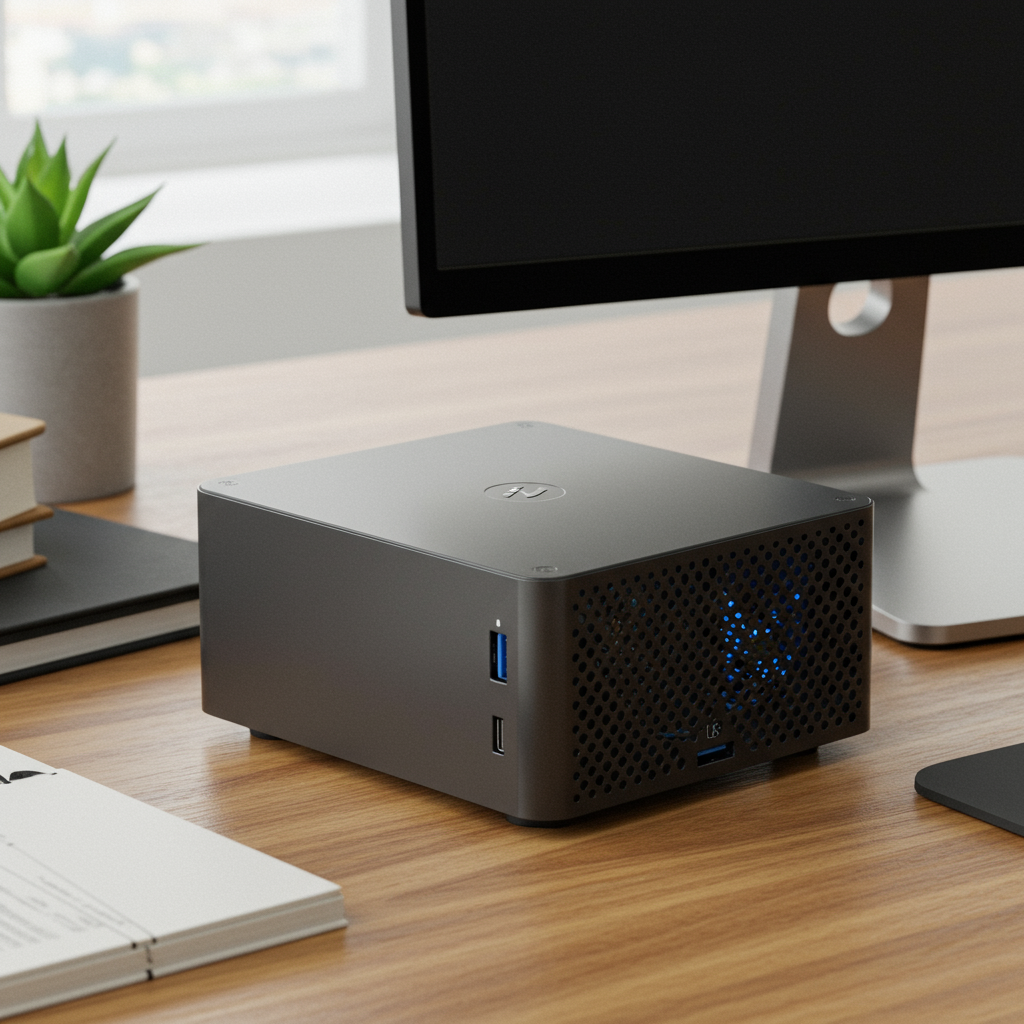
The Rise of Mini PCs: Why Small Computers Are a Big Deal
Mini PCs are having a moment—and it’s not just hype. These compact, quiet machines are powerful enough for work, play, and everything in between. Whether you're editing video, gaming retro-style, or just want a clean desk setup that doesn’t scream “IT department,” mini PCs might be exactly what you’re looking for.
Here’s what makes these tiny computers worth talking about—and why more people are switching from laptops and bulky towers to minimalist computing setups.
What Is a Mini PC?
A mini PC is exactly what it sounds like: a full-featured computer shrunk down to the size of a paperback book—or smaller. Some models fit in your pocket; others sit neatly behind your monitor using VESA mounts.
Despite their size, they’re surprisingly capable. You’ll find fast processors (like Intel Core i7s or AMD Ryzen chips), solid-state drives (SSDs), Wi-Fi 6 support, and even Thunderbolt ports—all packed into sleek little boxes.
Think: less clutter, same power.
Why People Are Choosing Mini PCs Over Laptops & Desktops
1. 💪 They Pack Real Power
Today’s mini PCs aren’t underpowered gadgets—they run full operating systems (like Windows 11 or Linux) and can handle demanding tasks like:
- Editing high-resolution photos
- Running multiple apps at once
- Streaming 4K media without stuttering
- Coding complex projects with Docker containers
For example, the Intel NUC 13 Pro comes with up to an Intel Core i7 processor and supports dual-monitor output—perfect for multitasking professionals who don’t want the bulk of a tower or the heat throttling of some laptops.
2. 🎮 Great for Retro Gaming & Emulation
Let’s be honest: sometimes you just want to relive the glory days of Mario Kart™ or Final Fantasy VII without digging through old consoles. Mini PCs make this super easy.
Install emulators like Batocera or RetroArch on even low-end models and you’ve got yourself:
- A plug-and-play retro game station
- Instant access to thousands of classic games
- HDMI out = connect directly to your TV
It’s nostalgia made simple—with no massive rig required.
3. 🧳 Lightweight Yet Work-Capable Travel Machines
Traveling but still need real computing power? Toss one of these into your bag along with a portable monitor. Done.
Many creative professionals—especially video editors, streamers, podcasters—use mini PCs as mobile production stations when traveling light is key but performance still matters.
Pair them with wireless peripherals and USB-C docks for an ultra-mobile workstation setup that rivals more expensive laptops… at half the price.
4. 🔌 Lower Energy Use = Lower Bills
Most mini PCs sip electricity compared to traditional desktops:
💡 Typical usage:
- Laptop: ~60W
- Desktop Tower: ~300W+
- Mini PC: often between 10–30W
That adds up over time—not just on your utility bill but also on environmental impact if you're trying to go greener with your tech choices.
How Do Mini PCs Compare To Laptops?
| Feature | Mini PC | Laptop |
|---|---|---|
| Portability | ✅ Small + lightweight | ✅ Fully portable w/ screen |
| Performance | ✅ Often stronger cooling & CPU | ⚠️ Can throttle under heavy load |
| Upgradability | ✅ RAM/SSD easily upgraded | ❌ Limited upgrade options |
| Price | ✅ Budget-friendly | ❌ Premium specs = $$$ |
| Display Included? | ❌ No built-in screen | ✅ Built-in display |
If portability means working from coffee shops daily—a laptop may suit you better. But if you’re mostly stationary or already have a monitor setup? A mini PC delivers better value for most people in terms of raw performance per dollar spent.
Best Budget-Friendly Mini PCs Right Now (2024)
You don’t need deep pockets to try out one of these space-saving devices:
👉 Beelink SER5 — Under $300 with AMD Ryzen chip + Vega graphics
👉 CHUWI HeroBox — Entry-level option around $200 that runs Windows smoothly
👉 Intel NUC Kit — Modular builds let DIYers customize everything
👉 Apple Mac Mini M2 — Not cheap (~$599+), but great value compared to other Macs
All offer solid everyday performance—and some can even double as home servers or multimedia hubs without breaking a sweat (or breaking your budget).
Want Your Desk Setup To Look Clean & Cool?
One underrated perk? Aesthetic freedom 🙌🏼
Mini-PCs open up minimalist workspace designs that feel both modern and functional:
🖥 Mount it behind your monitor using VESA brackets
🌈 Add subtle RGB lights underneath shelves
📦 Hide cables inside cable trays/tunnels
🌿 Add plants / neutral tones / matte finishes
The result? A productive space that doesn’t look like it belongs at an airport security checkpoint circa ’99 👀
Need inspo? Check out r/battlestations on Reddit—it’s basically Pinterest for desk setups powered by tiny computers hiding behind gorgeous screens.
Unexpected Ways People Are Using Them
Mini-PCs aren't just desktop replacements—they're flexible tools for all sorts of niche uses:
✔️ Home servers running Plex media libraries 💾
✔️ Dedicated smart home hubs via Home Assistant 🏠
✔️ Zoom call command centers w/ ring lights + mic arms 🎙️
✔️ Portable DJ booths / MIDI control rigs 🎛️
✔️ Digital signage controllers in retail spaces 🛍
Once you've owned one—you start finding excuses to buy more because they're so useful…and honestly kinda addictive 😅
Final Thoughts: Tiny Computers That Get Stuff Done
Mini-PCs prove something important about modern tech—it doesn't have to be big…to do big things 🚀
Whether you're building out:
✅ A budget-friendly workstation
✅ An aesthetic streaming cave
✅ Or simply downsizing from clunky hardware—
These small machines offer flexibility most desktops can’t match—and performance many laptops envy—all while staying efficient enough not to fry eggs off their chassis 🔥🍳😉
They simplify how we work and how we live—with fewer wires, less noise…and way more style than you'd expect from something smaller than most routers 🤷♂️💻✨
So yeah—size isn’t everything…but when it comes wrapped in matte black aluminum housing with PCIe SSD speeds?
It definitely helps 😎
📚 Want More?
Check out this guide comparing top picks across brands → Best Mini-PCs of 2024 – Tom's Hardware
✍ Written by EclecticSilence.com – where nerdy meets neat.
We write tech content that's human-first—not jargon-first 🙃



Leave a Reply