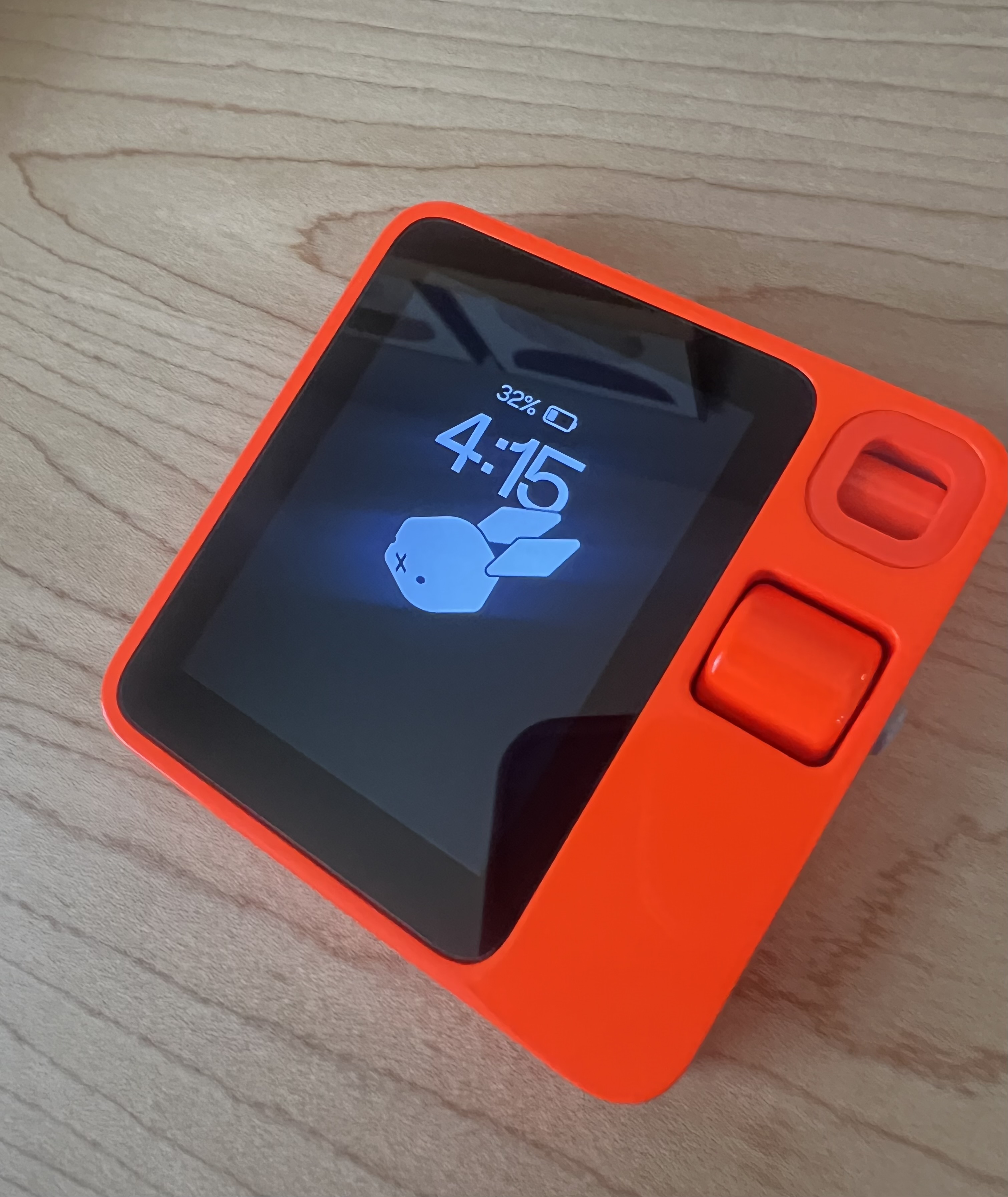
When I first saw the Rabbit R1, I was immediately drawn to its sleek design and bold, bright orange color. At $199, it seemed like a relatively affordable price point, especially since it comes from Teenage Engineering—a company known for creating stylish and innovative tech products. It looked like the perfect standalone AI device to add to my collection. But after spending some time with it, my experience has been mixed. Here’s my take on the Rabbit R1, covering everything from its design and performance to the small details like battery life, touch screen responsiveness, and software updates. We’re about to go down the rabbit hole—literally and figuratively.
Rabbit R1 Design and Aesthetics
Let’s start with the obvious: the design. The Rabbit R1 has a sleek, modern look that’s hard to miss. The bright orange color? It’s a statement piece that stands out in a sea of black and silver gadgets. It’s one of those devices that instantly becomes a conversation starter. People notice it, and I’ve lost count of how many compliments I’ve received on its design alone.
But it’s not just the color; the overall design is on point too. Teenage Engineering, led by CEO Jesse Lyu, clearly wanted the Rabbit R1 to be more than just another device. It’s meant to be the star of your tech lineup. The design is modern, almost futuristic, with clean lines and a minimalistic vibe. It looks stylish and functional. The bright orange color adds a touch of fun while still keeping it sophisticated, much like the Humane AI Pin, which also combines sleek design with innovative functionality.
Build Quality and User Experience
But here’s the thing: while it looks great, the build quality doesn’t match up. The materials used in its construction don’t feel as premium as they look. When you pick it up, it’s lighter and feels cheaper than you’d expect for something that costs nearly $200. It’s like the Rabbit R1 is all about first impressions, but once you start using it, you notice the flaws.
For example, the scrolling wheel, which is supposed to help you navigate the small 2.88-inch screen, feels flimsy. It’s supposed to offer precise control, but sometimes it’s unresponsive. This leaves you wishing for something more solid. The haptic feedback, which should add to the experience, is also a letdown. It’s there, but it’s not as crisp or satisfying as it could be. The lack of strong feedback makes interacting with the device less engaging. This is especially true when you’re trying to navigate the home screen or the settings menu. The push-to-talk button, located on the right side of the device, also suffers from similar issues. It works fine at times, but its inconsistency can be frustrating.
Rabbit R1 Performance and Functionality
Now, let’s get into the performance, because that’s where things get interesting—and a bit frustrating. The Rabbit R1 was hyped up during its launch, with promises of cutting-edge features and seamless functionality. The large action model was supposed to be a game-changer, offering a unique experience powered by Rabbit OS. But honestly, using it has been a rollercoaster.
Battery Life and Portability
Let’s start with the basics: how does it perform day-to-day? The answer is, well, complicated. First off, the battery life is just okay—nothing to get excited about. I expected it to last longer, especially for a device marketed as versatile and portable. But keeping it charged feels like a daily chore. The USB-C port works fine, but charging takes longer than I’d like. It’s annoying when you’re in the middle of something, and suddenly you’ve got to plug it in again. If you’re using the Rabbit R1 lightly, it’ll probably get you through the day. But if you’re really putting it through its paces, you’ll be reaching for the charger more often than you’d want.
This is a big deal because one of the Rabbit R1’s main selling points is its portability. If you’re someone who’s always on the go and needs a device that can keep up, the Rabbit R1 might leave you disappointed. The constant need to recharge takes away from the convenience, making it less reliable as a portable device. I found myself constantly trying to conserve battery life, which isn’t something you should have to worry about with a modern gadget.
Touch Screen and Software Issues
Then there’s the touch screen, which is another area where the Rabbit R1 doesn’t quite hit the mark. It’s mostly responsive, but there are times when it just doesn’t register my touch as it should. I’ve had to tap multiple times to get it to respond. That gets old fast, especially when you’re trying to get something done quickly. The Rabbit OS, which is supposed to run the show, sometimes feels sluggish. There are moments when it works fine, but other times it struggles to keep up. This leads to delays and occasional freezes. It feels like the OS is trying to do too much and can’t quite handle it all in its current state.
Navigating through the small screen can also be a challenge. While the 2.88-inch screen is supposed to be compact and portable, it often feels cramped. This is especially true when you’re trying to do more complex tasks. The screen size limits how much info you can see at once. This makes browsing or reading messages a hassle. The Rabbit R1 feels more like a secondary device than something you’d rely on as your main gadget.
Software Updates and SIM Card Setup
And then there’s the issue of constant software updates. It seems like every time I turn it on, there’s a new update waiting to be installed. On one hand, it’s great that the company is actively working to improve the device. But on the other hand, it’s a hassle, especially when the updates don’t always bring noticeable improvements. Worse, sometimes they introduce new bugs. These software updates, while necessary, can make the device feel like it’s still in a beta phase. That’s not exactly reassuring for a product that’s already on the market.
The SIM card setup was another unexpected headache. You’d think that inserting a SIM card and getting connected would be straightforward. But it turned into a bigger hassle than it should have been. It took way more time than I expected to get it working, and even now, it’s not always reliable. Connectivity issues have popped up more than once, leaving me wondering if it’s even worth the trouble. The idea is that you can take this device anywhere and stay connected. But in reality, it doesn’t quite live up to that promise.
Voice Commands, Camera, and Connectivity
The Rabbit R1 also struggles with accuracy in certain tasks. For example, when using voice commands or asking it simple questions, it sometimes gives wrong answers or just doesn’t respond at all. This can be really frustrating, especially when you’re relying on the device to help you quickly. The inconsistencies in its performance are one of the major missing features that hold it back from being the next big thing in AI devices.
Camera and Vision Feature
Now, let’s talk about the camera, which was another big selling point of the Rabbit R1. The large action model was supposed to deliver top-notch image quality. But honestly, the camera is underwhelming. The pictures it takes are grainy, especially in low light, and it just doesn’t live up to the hype. For a device that’s supposed to be cutting-edge, this was a major letdown. I expected more, especially since the camera was marketed as one of the Rabbit R1’s standout features.
The vision feature, which uses AI to recognize objects and provide useful info—kind of like Google Lens—is another area where the Rabbit R1 falls short. While the idea is cool, the execution isn’t great. The feature sometimes fails to recognize even common objects, making it unreliable when you need it most. It feels like a half-baked attempt at using artificial intelligence, and the results are mixed at best.
Music and Bluetooth Connectivity
If you’re into listening to music on the go, you might be interested in how the Rabbit R1 handles streaming services. But honestly, it’s not great compared to what I’m used to with other devices. Sure, it can handle basic playback from Apple Music and a paid Spotify account, but the experience is clunky. The small screen and limited controls make it hard to navigate playlists or find specific tracks quickly. It’s clear the Rabbit R1 wasn’t designed to be your main music player, and it shows.
Even connecting Bluetooth headphones to the Rabbit R1 wasn’t as smooth as I’d hoped. While it does support Bluetooth, pairing devices can be a pain. I’ve had the connection drop out a few times during playback. This is especially annoying when you’re trying to enjoy music or a podcast, and the connection just cuts out. The Bluetooth implementation feels like another area where the Rabbit R1 falls short compared to other devices in its price range.
Rabbit R1 as a Personal Assistant
One of the things I was really excited about with the Rabbit R1 was using it as a personal assistant. The idea of having a smart device that could help me manage my day sounded awesome. The Rabbit OS promised to be intuitive and helpful, making it easier to keep track of everything from my schedule to reminders and even quick updates on the weather. But, once again, the reality hasn’t quite lived up to the promise.
Voice Assistant and Privacy Concerns
The voice assistants built into the Rabbit R1 were supposed to offer a seamless, hands-free experience. But compared to more established voice assistants like Google Assistant or Siri, the Rabbit R1’s AI assistant feels underpowered. Simple tasks like setting reminders or sending voice recordings sometimes result in errors or unresponsive behavior. The Rabbit R1’s assistant lacks the sophistication of the large language models that power other voice assistants. This makes it a less reliable tool for managing your day.
When the Rabbit OS is working smoothly, the personal assistant features are actually helpful. I can set reminders, manage my calendar, and even get quick updates on things like the weather or traffic. But that’s only when it’s working smoothly. Too often, the OS lags or freezes, making the personal assistant features more of a hassle than a help. It’s like having an assistant who’s sometimes great but other times is half-asleep on the job—not exactly what you want in a personal assistant.
Privacy is another concern when it comes to voice assistants and AI devices. The Rabbit R1’s privacy policy leaves something to be desired. While the company assures users that their data is protected, the lack of transparency around how voice recordings and other personal data are handled is troubling. In today’s world, where data privacy is a major issue, having a clear and straightforward privacy policy is crucial. Unfortunately, the Rabbit R1 doesn’t do enough to instill confidence in this area.
Online Portal and Customer Support
The online portal for managing the Rabbit R1 is another area where the device falls short. While it’s supposed to offer a convenient way to manage settings and updates, it’s often slow and lacks the intuitive design you’d expect from a modern web interface. Navigating through the portal can be frustrating, especially when trying to find specific options or settings. The experience feels outdated and clunky, adding to the overall sense that the Rabbit R1 isn’t quite ready for prime time.
I really wish I could say that customer support made up for some of the Rabbit R1’s shortcomings, but unfortunately, that hasn’t been the case. When I encountered issues with the device—whether it was the unreliable assistant, the SIM card setup troubles, or the sluggish Rabbit OS—I reached out to customer support, hoping they could provide some solutions. But their response was underwhelming.
When I contacted them, I got a standard reply thanking me for my feedback and saying they would pass it along to the team. But that was it—no real help, no troubleshooting tips, nothing. It felt like they were just brushing off my concerns without actually addressing them. For a product that’s supposed to be innovative and cutting-edge, the lack of robust customer support is a huge downside. It leaves you feeling like you’re on your own when things don’t work as they should.
Good customer support can make or break your experience with a product. When you run into issues, you want to know that there’s someone on the other end who’s ready and willing to help you solve them. Unfortunately, that hasn’t been my experience with the Rabbit R1. The lack of meaningful support adds to the overall frustration with the device, making it even harder to recommend.
Future Potential
So, with all these issues, why haven’t I completely given up on the Rabbit R1? Honestly, it’s because I see the potential. The idea behind the device is solid, and if they can iron out the kinks with future software updates, it could still be something special. Teenage Engineering clearly has a vision for the Rabbit R1, and I’m hopeful that they can make it happen.
Right now, it’s a waiting game. I’m holding out for those software updates that will hopefully fix the various issues and bring the Rabbit R1 closer to what was originally promised. There’s a lot of potential here, but it’s not quite realized yet. I’m hoping that Teenage Engineering will listen to user feedback and make the necessary improvements. The concept behind the Rabbit R1 is genuinely exciting.
The Rabbit R1 represents a bold attempt to create something new and different in the world of personal technology. It’s a device that aims to do more than just be another gadget—it’s supposed to be a companion, a tool that helps you navigate your day and stay connected. But to fulfill that promise, it needs to overcome the hurdles that are currently holding it back. If Teenage Engineering can address these issues in future updates, the Rabbit R1 could still live up to its potential.
Final Thoughts
The Rabbit R1 is a device that has so much promise, but it’s not quite there yet. It looks great, and the concept is solid, but the execution leaves a lot to be desired. The build quality isn’t as good as it should be, the performance is inconsistent, and the customer support is lacking. The Rabbit OS, which powers the device, needs significant improvement to match the device’s ambitions.
If you’re thinking about picking up a Rabbit R1, just know that it’s still very much a work in progress. There are some cool features, and when it works, it’s awesome. But there are also a lot of frustrating moments where it just doesn’t live up to expectations. I’m hopeful that future software updates will fix these issues and make it the device it was meant to be.
In the meantime, if you’re curious about what they’re working on or just want to stay updated, you should definitely check out their Discord page. It’s a bit of a rabbit hole in itself, but in a good way—you’ll find all sorts of info and maybe even get a sneak peek at what’s coming next for the Rabbit R1.
If you’re someone who loves to be on the cutting edge and doesn’t mind dealing with some bumps along the way, the Rabbit R1 might be worth a try. But if you’re looking for a polished, reliable device, you might want to wait until the kinks are worked out. The Rabbit R1 is an intriguing glimpse into what could be, but it’s not quite ready to be your go-to gadget just yet.
Check out our other tech post.




Leave a Reply